
How Capture works
Capture is DialogSphere's software that turns the commercial documents your company receives — orders, delivery notes, confirmations, quotations, invoices — into data ready for your ERP, with no one retyping anything by hand. Here we explain, step by step, what it does and how.
What Capture is
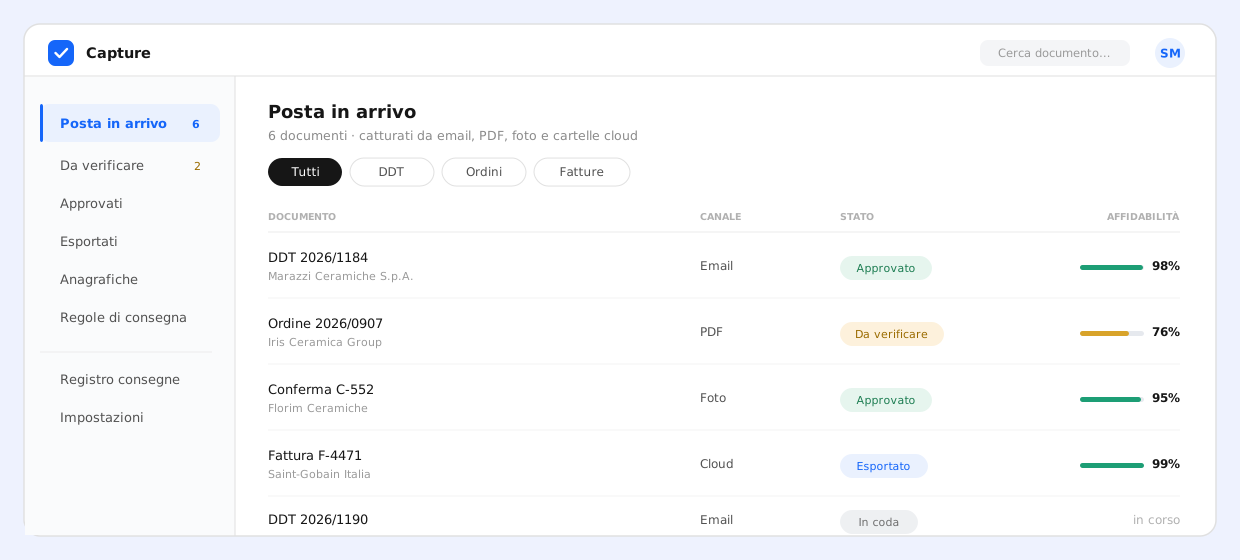
Capture works with documents as they arrive: a native PDF, a scan, a crooked photo taken on a phone in the warehouse, an email attachment. It reads them with artificial intelligence, extracts the data, checks that it is consistent and delivers it into your ERP.
It is not classic OCR and it is not an ERP: it sits in between — between the documents you receive and the software you already use — and makes manual entry disappear. An operator steps in only where there is a real doubt; a person always stays in control.
It is built for Italian SMEs: distribution, manufacturing, logistics, B2B services — anyone who receives dozens or hundreds of documents from suppliers and customers every day and has to get them into an ERP.
The problem: manual data entry
In almost every commercial company someone opens documents one by one and retypes their data into the ERP. It is minutes per document, repeated hundreds of times a month.
This work has a cost that often goes unmeasured: hours taken away from more useful tasks, typos discovered too late, queues that pile up and a backlog every Monday morning. And the more the company grows, the more documents arrive — while the hours in a day stay the same.

Capture removes exactly this task: the data lands in the ERP on its own, and all that is left for the person is the final check, where it actually matters.
How it works, step by step
A document's journey through Capture is always the same, whatever channel it comes from. It is five steps.
1. Multi-channel capture
The document comes in however you prefer: forwarding an email to a dedicated inbox, uploading a PDF from the console, taking a photo with a phone through a QR code (handy in the warehouse and for drivers, with no app to install), or letting Capture watch a Google Drive or Dropbox folder. There is also an API for connecting it to another system. The same document arriving twice from different channels is recognised as a duplicate.
2. AI reading and extraction
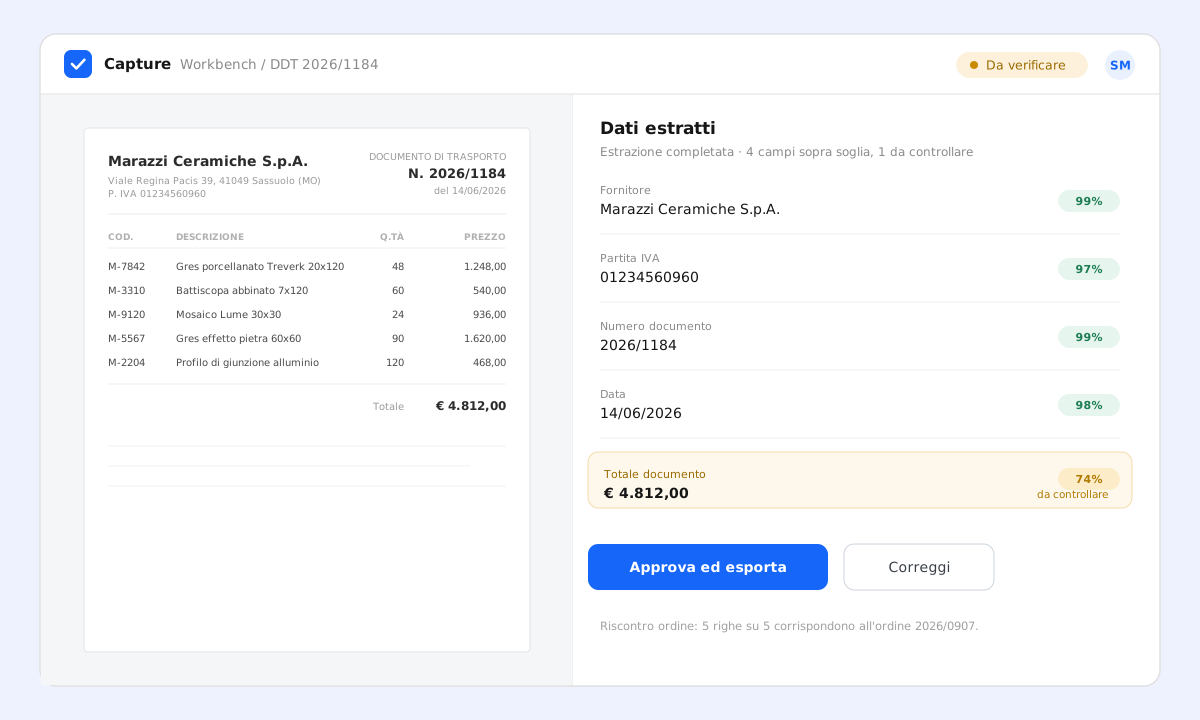
In seconds the AI reads the document and extracts the data: supplier, VAT number, dates, document numbers, line items with code, description, quantity, prices, discounts, VAT rates and totals. For photos and scans an OCR step cleans up the text before reading. No per-supplier templates to configure: Capture reads the document for what it is.
3. Automatic checks
Extracting is not enough: before treating a document as valid, Capture runs the objective checks a piece of software should do on its own.
- VAT-number checksum, to discard clearly wrong numbers
- Reconciliation between line items and document totals
- Plausible, consistent dates
- Comparison with your master data (customers, suppliers, items) to attach the right codes
If everything adds up and is above the confidence threshold, the document can be approved automatically. If something is off, it is held and flagged.
4. Review, only where needed
Uncertain documents go into a review queue. The operator opens the document and sees the PDF next to the extracted fields, with the doubtful points highlighted: they fix it in seconds, confirm and export. Every correction is recorded and used to improve later extractions for that supplier.
5. Delivery to your ERP
The verified data reaches your ERP the way you prefer: a direct connection, a file dropped in a secure folder, a CSV or an Excel. Field mapping to your ERP is configured once; from then on a delivery log shows the outcome of every send, with a one-click resend.
Which documents it handles
Capture specialises in structured commercial documents — the ones with a header and line items:
- Purchase orders
- Delivery and transport notes
- Order confirmations
- Quotations and supplier offers
- Foreign supplier invoices (Italian e-invoices already arrive structured via SDI and don't go through here)
The field schema is extensible: if your industry has particular information to capture, custom fields are added without disrupting anything.
Beyond extraction: goods reconciliation
Extraction is the prerequisite. The work that really makes the difference is the check: does what arrived match what you ordered?
When a delivery note comes in, Capture finds the linked order on its own and compares the lines item by item: it flags delivered quantities that differ from those ordered, items delivered but never ordered, and items ordered but not delivered. The operator sees the differences immediately, with a link to the original order.
How it integrates with your ERP
Capture does not replace your ERP: it delivers data to it. Delivery is composable, so it adapts to whatever your software can receive:
- Direct connection via webhook (signed JSON, with automatic retries on error)
- Files dropped via SFTP, in real time or on a schedule (daily, weekly, scheduled)
- CSV or Excel exports ready to import, with your ERP's field mapping
- REST API for custom integrations
Your ERP isn't on the list? If it accepts a file or an HTTP call, it integrates. Field mapping is configurable and set up once.
Security and data in Europe
Commercial documents contain sensitive data about the company and its partners. That is why Capture is built with security as a requirement, not an add-on.
- Data and infrastructure in Europe: no extra-EU transfer of your documents
- Secrets and credentials encrypted at rest (AES-256-GCM) and TLS everywhere
- Two-factor authentication, sessions and role-based permissions (operator, manager, admin)
- Immutable audit log of every action and configurable document retention
The same goes for this site: no cookies, no tracking tools, no third-party fonts.
Frequently asked questions
Do I need a template for each supplier?
No. Extraction is AI-based and reads the document without templates. Your suppliers' recurring layouts are still learned over time and used as a further quality check.
What if the AI gets it wrong?
The objective checks (VAT, reconciliations, master data) block automatic approval and send the document to review, with the doubtful fields highlighted. The person fixes it in seconds, and every correction improves later extractions.
How long to get started?
Not long: you create a dedicated email inbox, set up field mapping with a preview of the result and run a few tests on real documents. Most companies are live within a few days.
Where do my documents end up?
On European infrastructure, in isolated spaces, with an audit log of every access and configurable retention. No transfer outside the European Union.